Written by Chette Soriano
Mambo allows you to easily include custom HTML content on the sideblocks of your website. For example, if you want to put a donation button on the right column of your page.
The old way of doing this is by hard coding the custom HTML content on your template. This, however, would be a time-consuming process. Imagine if you just need to correct a misspelling, or if you simply want to temporarily hide this content from your users -- you would need to edit and manually upload your new template every time.
VISIT
Showing posts with label JOOMLA : TEMPLATE DESIGN. Show all posts
Showing posts with label JOOMLA : TEMPLATE DESIGN. Show all posts
Module Basics: Putting custom HTML content on the sideblocks
Labels:
JOOMLA : TEMPLATE DESIGN


Understanding Joomla Template - Styles _lost part
Labels:
JOOMLA : TEMPLATE DESIGN

When a module is called in the index.php, it has several option on how it is displayed. The syntax is:
mosLoadModules('$position_name'[, $style] )
The $style is optional and can be 0, 1, -1, -2 or -3.
0 = (default display) Modules are displayed in a column. The following shows an example of the output:....
CLICK & READ
Understanding joomla template design
Labels:
JOOMLA : TEMPLATE DESIGN
 Series this article
Joomla - Template: Understanding Basic Template (Part 1)
Joomla - Template: Understanding Module Position (Part 2)
Joomla - Template: My First Template (Part 3)
Joomla - Template: Activate Template (Part 4)
Joomla - Template: Creating Layout (part 5)
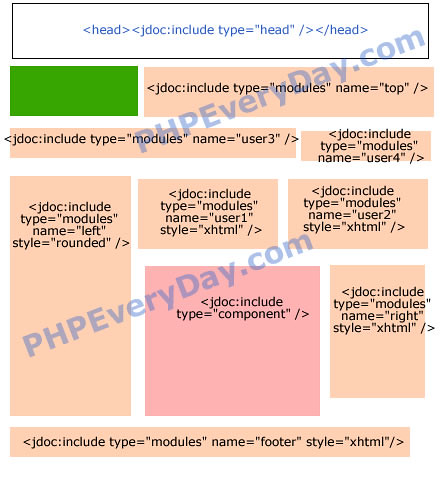
Joomla - Template: Using jdoc (part 6)
Joomla - Template: Using Parameters (Part 7)
Joomla - Template: Place Text (Part 8)
Joomla - Template: Creating Preview Thumbnail (Part 9)
READ
Easy way of creating Joomla Template - Tutorial
Labels:
JOOMLA : TEMPLATE DESIGN

1. Conceptualize the design of your website
Before doing any template development, the first step is always to come up with the “look” of your website. I personally use Macromedia Fireworks (now Adobe Fireworks), or doodle on good ol' fashioned paper.
Use the graphics program you're most comfortable with. And yes, enough of this Photoshop vs. Illustrator vs. Fireworks debate.
As a general rule, make the mockup as simple as possible. Try to avoid designing mockups which require you to use complicated nested tables.
VISIT
Subscribe to:
Posts (Atom)
